

Miragon AIDesign
designIQModel with your team and your AI. Release by pull request.
A self-hostable workspace on your GitHub repo for teams who design processes together. AI assistants join over MCP, and every model stays a plain file in your repo.
The problem
Process models live outside the repo your team reviews in
Process models usually live in a separate modelling tool, away from the repo your developers work in. One person at a time works on a diagram there, and nobody signs it off in a pull request. An AI assistant either cannot see the current model, or it rewrites the whole BPMN XML when it changes one. In review, a DMN change arrives as an XML diff, where a >= that became > is easy to miss.
Today
- Models in a separate tool, signed off outside Git
- One person at a time per diagram
- An AI that cannot see the current model
- DMN changes reviewed as an XML diff
With designIQ
- Plain files in your GitHub repo, released by pull request
- One live version that your team edits together
- AI assistants work on the same live models over MCP
- The pull request lists every DMN test case whose answer changed
How it works
One live model in your repo, released by merge
Your team models the to-be process and signs it off by merge. The AI drafts models and changes them on request.
Point it at your repo
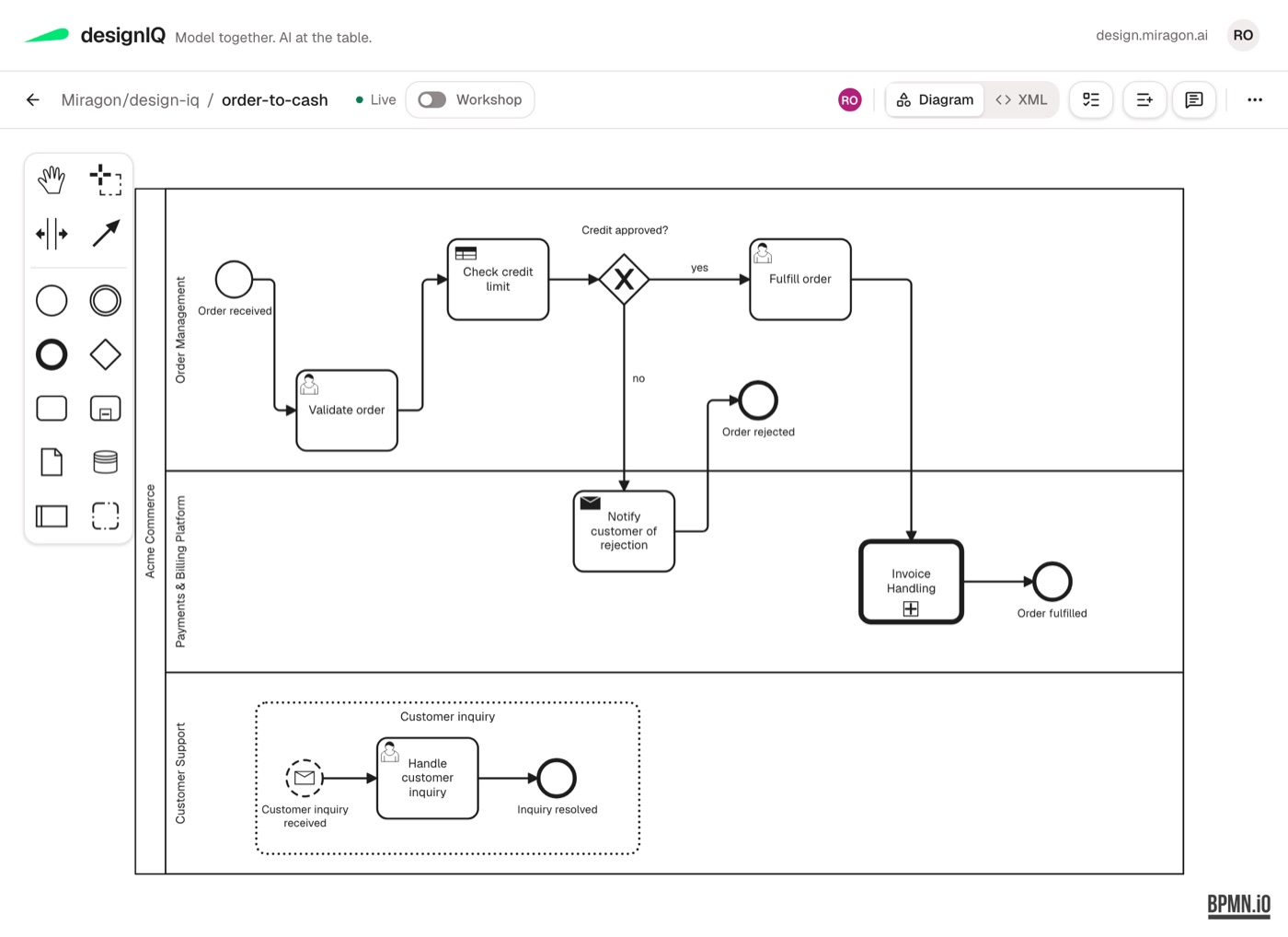
Your models live in a GitHub repo with a root designiq.yml that names the models folder. Each model is a plain file there, such as order-to-cash.bpmn.
Model together
Your team edits in the browser and sees one live version of each model, with a visual modeler for six notations.
Let the AI join
AI clients connect to the /mcp endpoint of the same server. Their saves are validated, and whoever has the model open sees the agent as a co-editor.
Release by pull request
A release runs the validator, pushes a branch and opens a pull request. CODEOWNERS and branch protection decide who approves.
AI in the workspace
Your AI works on the model your team has open
AI clients use the same server as the browser. With more than 30 MCP tools they read, validate and save every notation, simulate and test DMN, file todos and open the release pull request.
The modeler inside the chat
Chat clients that support MCP Apps, such as claude.ai, Claude Desktop and ChatGPT, show the modeler inline, with a link that opens the model in designIQ.
The agent as a co-editor
Whoever has the model open sees the agent in the roster, and the elements it changed are outlined on the canvas.
Validated saves
Every save is validated and never overwrites an edit someone made in the meantime.
Edits by element id, opt-in
With LIVE_MCP_BPMN_EDIT=1, the agent changes BPMN elements by id through bpmn-cli, and your hand-drawn layout stays.
Todos on BPMN elements
People and agents file todos anchored to BPMN elements. Each one is a GitHub issue and shows as a badge on the canvas.
Read-only where you need it
LIVE_MCP_READONLY=1 removes the write tools, and npx @miragon/design-iq-mcp reads any checkout without a running host.
Notations
Eight notations in one content repo
Next to BPMN and DMN, your strategy and architecture models can live in the same repo. Six notations have a visual modeler in the browser, and every file has a text view, which is how you edit Value Chains and Markdown.
- BPMN and DMNbpmn-js and dmn-js, with a workshop mode for sticky notes, a file history against the default branch, DMN simulation and test suites with rule coverage.
- Wardley Maps, Team Topologies, Context MapsVisual modelers for strategy, team and domain models, kept as files in the same repo as your processes.
- Event StormingA board sits next to the process with the same id, such as order-to-cash.storm next to order-to-cash.bpmn.
Get started
Run designIQ on your machine
One Docker command starts an evaluation container with the example models, without login. The designIQ docs have the command and the way to your own models.
Status
Where designIQ stands on 14 October 2026
The self-hosted platform is at v5.3.0, released on 13 October 2026 as the fourth release since 4 October. The repo (MIT licence) and the Docker image are public.
Hosted service pre-GA
design.miragon.ai is pre-GA, with the public launch planned around mid-November 2026. It asks you to sign in and connect GitHub.
GitHub only
Content repos live on GitHub. GitLab support is an open issue.
Login takes your own setup
Login, private repos and release as pull request need an OIDC provider and your own GitHub App. Without a GitHub App, the repo has to be public.
Semantic BPMN editing behind a flag
Opt-in with LIVE_MCP_BPMN_EDIT=1 since v5.3.0, and off by default until an A/B benchmark has run.
No playground yet
A hosted playground is an open issue. The Docker one-liner above is the way to try designIQ.
Skills for BPMN only
The seven Claude skills in the starter repo cover BPMN. The other notations have none yet.
Follow GitLab support in issue #5 and the playground in issue #43.
Proof you can open
Everything here is public
- Miragon/design-iqThe full platform under the MIT licence, with changelog and ADRs.Open
- Docker imageghcr.io/miragon/designiq-live-host for amd64 and arm64, pullable without login.Open
- process-documentation-starterA template content repo with BPMN processes, a DMN decision with tests, an Event Storming board and seven Claude skills for BPMN.Open
- @miragon/design-iq-mcpThe read-only MCP server on npm, at 5.3.0.Open
- @miragon/design-iq-validatorThe content repo validator on npm, at 5.3.0.Open
- Releasesv5.3.0 of 13 October 2026 and every release before it, with notes.Open
Where it fits
designIQ in the lifecycle
Models arrive as .bpmn files pushed to the content repo, or as drafts from Visio, draw.io, Word, Confluence or images through the starter's import-process skill. They leave as merged files in git, and findings from Optimize come back to them as todos.
- PhaseDesignYour team models the to-be process in designIQ and releases it by pull request.Learn more
- From AnalyseanalyzrIts as-is value chain can sit in the same repo as a .vc.json file. There is no direct link yet, and the two formats have not been checked against each other.Learn more
- Same phasebpmn-cliThe engine behind the opt-in semantic BPMN editing, where the agent changes elements by id and your hand-drawn layout stays.Learn more
- Next phaseImplementYour merged .bpmn and .dmn files are design models. Implement makes them executable.Learn more
- In ImplementSkillsThe bpmn skill for Claude Code is one way to make a merged design model executable.Learn more
- The way backOptimizeWhat you learn in Execute and Optimize comes back here as a todo on the BPMN element (a GitHub issue) or through the process-feedback skill.Learn more
Docs
The full reference is in the docs
Run designIQ on your own repos.
Tell us where your process models live today and who signs them off. We go through what designIQ covers for your team and what it does not cover yet.
Talk to usA 30-minute first call.