

Miragon AIAnalyse
analyzrWhich processes do you have, and how do they connect?
analyzr brings your process models from engines, BPM suites and modelling tools into one landscape. AI agents propose how the processes connect, your team decides, and you see what a change affects before you make it.
The problem
Your processes live everywhere, their links nowhere
Process models sit in engines, BPM suites, Visio files and in people's heads. Nobody has a reviewed picture of which process calls, messages or starts which, so every change and every migration starts with a guess about what it affects.
Today
- Models spread over engines, BPM suites, Visio files and people's heads
- Links hidden in call activities, messages and signals
- Folders sorted by department, not by value stream
- A hand-kept map that goes stale with the next change
With analyzr
- One landscape from every source that exports BPMN
- Every link proposed with confidence, rationale and evidence
- Each process placed on a step of your value chain
- What a change touches, before you make it
Where your processes come from
Import from wherever your processes live
analyzr reads the links standard BPMN 2.0 carries: call activities, messages and signals. Whatever exports BPMN can feed it. Today it is tested on models for Camunda 7 and Camunda 8.
- Works todayCamunda 7 and Camunda 8Upload BPMN files or whole folders in the browser, or push them with the CLI or REST. Models from CIB seven and Operaton come in the same way.
- BPMN export, not tested yetFlowable, Signavio and other BPM suitesThey export BPMN 2.0, and analyzr reads the links standard BPMN carries. We have not tested their exports yet.
- Via designIQVisio, draw.io, Word, ConfluencedesignIQ's import-process skill drafts a BPMN model from them. Your team checks the draft before it goes in.About designIQ
- Via designIQInterviewsdesignIQ's capture-process skill turns an interview with the process owner into a BPMN model.About designIQ
- PlannedDirect connectorsReading models straight from your engines, the Camunda Web Modeler or a Git repository is planned, not built.
How it works
From scattered models to a reviewed map
analyzr reads models that already exist. It does not mine event logs, read runtime data from your engines or generate BPMN.
Import
Bring in BPMN 2.0 files (.bpmn, .bpmn2, .bpmn20.xml) or whole folders in the browser, or with the CLI or REST. The folder path becomes the model key.
Extract
Code without an LLM reads calls, messages, signals, start and end events. It accepts call activities that point to exactly one process and proposes identical message and signal names.
Propose
AI agents in your MCP client judge the remaining candidate pairs with confidence, rationale and evidence. They also propose a value chain step for each process.
Decide
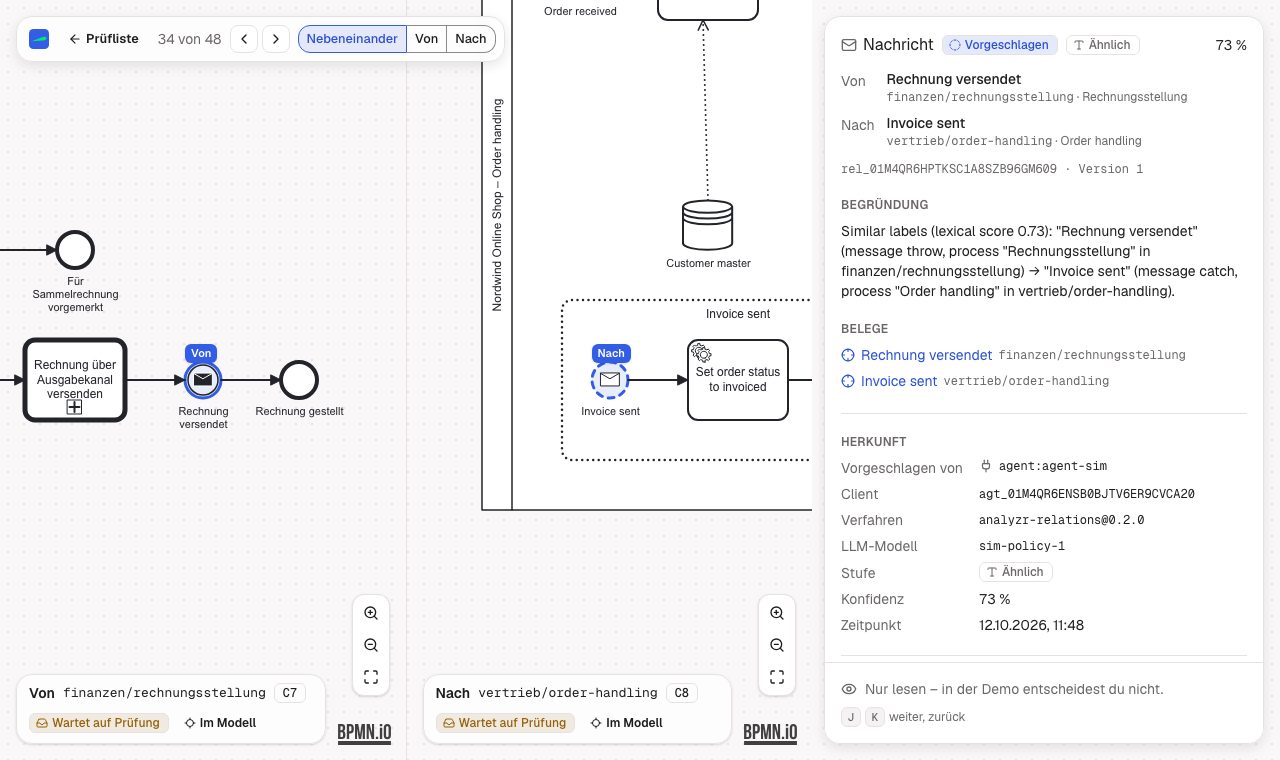
Your team sees both models side by side in bpmn-js and accepts, rejects, holds or corrects each proposal.
What your team gets
See what a change affects before you make it
The reviewed landscape shows which processes a change touches, which ones a migration has to move together and which steps of your value chain have no process yet. Every relation and placement records who proposed it, with confidence and rationale, and who decided.
- RelationsEvery call, message, signal and trigger between your processes, with confidence, rationale and the decision.
- Value chain placementsEach process on its step of your value chain. You draw the chain in the browser or import it as a .vc.json file.
- FindingsGaps such as unresolved calls or processes without a value chain step.
- RevisionsA changed model becomes a new revision. Agents see it again only if its facts changed, and your decisions stay unless an endpoint's meaning changed.
- REST and MCPThe landscape goes out over REST (OpenAPI 3.1) and to your agents over MCP read tools.
- Value chain fileThe value chain goes out as a .vc.json file in the format of the public value-chain-modeler.
Human and AI
Agents propose, your team decides
A rule settles what it can without an LLM. Agents propose the rest, and each proposal waits for your team or for an auto-accept rule the project owner set.
Agents never decide
Agents propose links and placements. Their project tokens never get the review scope, and no MCP tool accepts a proposal.
No LLM credentials in analyzr
The model comes with your agent, for example Claude Code on your own subscription or API key.
Auto-accept is off by default
Only the project owner can set auto-accept rules, per kind, tier and minimum confidence.
Each pair judged once
Agents judge every candidate pair once, even with several agents at work. A "no link" verdict stays visible to your reviewers.
Get started
Open the demo in your browser
Nothing to install and no login. The demo project nordwind-handel is a synthetic landscape of 31 models for Camunda 7 and Camunda 8. The demo stops when idle, so the first request can take a few seconds.
Status
Where analyzr stands on 14 October 2026
analyzr 0.1.0-alpha.0 is an early alpha, and the public demo runs the same version.
Private repository
The source (MIT licence) sits in a private repository for now. No release, image or package is published.
Local mode only
analyzr runs with one owner on 127.0.0.1.
German only
The web UI is German only, and the agent procedure asks for rationales in German.
A simulated demo
The demo's proposals come from a simulation agent without an LLM. They show the workflow, not the quality of a model, and we have not published numbers on proposal quality yet.
Proof you can open
The demo is public, the source not yet
- Read-only demoTwo synthetic landscapes with their value chains, proposals and review screens. No login needed.Open
- REST API descriptionOpenAPI 3.1, served by the demo, with the routes for the landscape, relations, findings and value chains.Open
- Miragon/value-chain-modelerThe public editor for the .vc.json format, at 0.4.0. analyzr pins the format packages at 0.3.0, and we have not verified that files move between the two without loss.Open
Where it fits
analyzr in the lifecycle
analyzr captures your as-is landscape once, at the start. The loop then runs from Design to Optimize, and what your team learns in Optimize goes back into Design.
- PhaseAnalyseThe phase that runs once, before the loop. It shows how your processes connect and where each one sits in your value chain.Learn more
- Next phaseDesignYour team takes the reviewed map into Design and knows which processes a change touches. analyzr has no direct connection to the Design tools yet.Learn more
- Model the changedesignIQModel with your team and your AI, and release by pull request.Learn more
- Model the changebpmn-cliYour agent edits the model by naming elements, and the tool writes the XML.Learn more
- Runtime dataPulseAsk your engines in Execute what is stuck and why. analyzr reads no runtime data.Learn more
- Runtime dataoperateWhat is stuck on your engine, in one command, for the shell, a coding agent or CI.Learn more
Map your own process landscape.
Tell us where your processes live today and which change you are planning. Until the source is public, self-hosting goes through us.
Talk to usA 30-minute first call.